Play Futoshiki Online
About Futoshiki
Futoshiki is a Latin-square logic puzzle. On an N×N grid you place the numbers 1 to N so that each appears exactly once in every row and every column. Unlike Sudoku, though, some pairs of neighbouring cells carry a “greater-than” sign that the two numbers must obey. Those inequality clues, not a scattering of given digits, are what pin the solution down.
Every board here is generated fresh from a random seed and is guaranteed to have exactly one solution, so you never have to guess: each move follows from the rows, columns, and signs already on the board. The seed lives in the page URL, so you can bookmark or share a specific puzzle and return to the exact same grid later. Pick a size above (from a gentle 4×4 up to a demanding 7×7) to start.
Size is what changes the character of the puzzle here, not just its length: a 4×4 board has so few inequality signs that most of them are usable almost immediately, while a 7×7 grid spreads its signs thinner across a much bigger Latin square, so an early chain often has to combine two or three separate inequality pairs before it forces a single cell. The signs themselves never move once a puzzle loads; only how far their consequences reach changes with size.
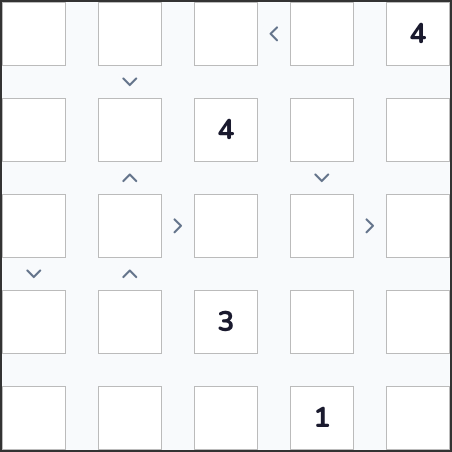
How to play Futoshiki
- Fill every cell so each row and each column contains the numbers 1 to N exactly once, where N is the grid size (4, 5, 6, or 7).
- Between some adjacent cells sits a “greater-than” sign. The number in the cell on the open (wide) side of the sign must be larger than the number in the cell on the pointed side. A sign is satisfied only when both cells are filled and the order is correct.
- A few cells start with a fixed number to anchor the puzzle; the rest are deduced from the inequality signs and the Latin-square rule.
- Notes (pencil marks) let you record candidate numbers in a cell without committing, which helps once the direct deductions run out.
- The puzzle is solved the moment every cell holds a valid number with no row, column, or inequality broken; there is no separate submit step.
Controls (touchscreen)
- Tap a cell to select it.
- Tap a number on the on-screen pad to place it in the selected cell.
- Tap the Notes toggle to switch to pencil-mark mode, so tapping a number adds it as a small candidate mark instead of a final answer; tap again to return to normal entry.
- Tap Erase to clear whatever is in the selected cell.
- Tap Undo to step back through your recent moves one at a time.
Controls (PC)
- Click a cell to select it.
- 1-7Type a digit to fill it in directly from the keyboard.
- 0BackspaceDeletePress 0, Backspace, or Delete to clear the selected cell.
- SpacePress Space to toggle Notes (pencil-mark) mode for subsequent keypresses.
- CtrlZPress Ctrl+Z (or Cmd+Z on Mac) to undo your last move.
- Arrow keysUse the Arrow keys to move the selection to an adjacent cell.
Every Futoshiki puzzle is fair
Futoshiki’s inequality signs get held to the identical proof standard as a Sudoku digit: nothing is cleared from a generated grid until the solver has ruled out any second Latin square that could still satisfy the surviving rows, columns, and signs. Because that check runs against the finished puzzle rather than the recipe used to build it, a sparse 7×7 board is just as provably single-answer as a clue-heavy 4×4 one.
The sign and given counts rise together as the grid grows: 4×4 samples 6 signs toward a floor of 2 remaining givens, while 7×7 uses 14 signs toward a floor of 5. That floor is a target the dig loop is free to miss upward, never downward: it always leaves more clues in place rather than risk a second valid grid.